Breeze – Shoutcast and Icecast HTML5 Radio Player With History

 Recently Updated
Well Documented
Recently Updated
Well Documented
FEATURES:
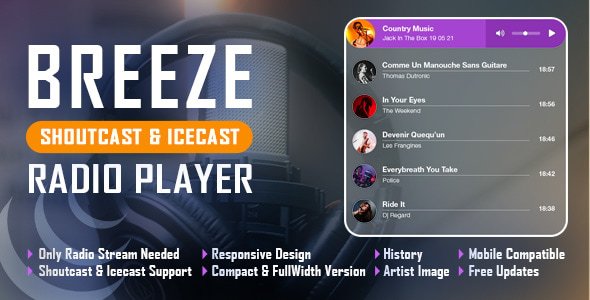
Shoutcast & Icecast Support
It supports Shoutcast and Icecast radio streaming. The radio stream should be MP3 type. It will also play AAC streams but only on browsers which support AAC
Only Radio Stream Needed
Just add the radio stream and the player will get the current playing song and artist photo.
Responsive Design
The radio player can be used in websites which are responsive.
Full Width Option
The radio player width can cover the full width of the parent div.
Mobile Compatible
It is compatible with IOS and Android operating systems.
Artist Image
The player will display the photo of the current playing singer, if it is present in the database.
Highly Customizable
Over 35 parameters from where you can customize the player, having the possibility to integrate it in any design.
Rounded or Square Borders
Parameter to set the border radius which will allow you to have a player with rounded corners or square corners.
History
It will automatically get the history for ShoutCast streams. For IceCast streams it will generate the history as the radio plays.
Show/Hide History
Parameter to load the player with history or without history.
Multiple Instances
You can insert multiple radio players on your website or on the same page (maximum 2 on the same page).
Notes for IOS/Android (restrictions imposed by Apple/Google):
1. The autoplay will not work because IOS/Android disables autoplay feature and it can’t be controlled from JS
2. Volume controllers will not work on IOS/Android. You’ll have to adjust the volume with physical buttons of the mobile device.
3. ShoutCast version below 2.0 doesn’t function on iOS 11. Please update ShoutCast server to at least v2.0
4. Icecast 2.4 kh4/kh5 do not function on iOS 11. Older versions (2.3.3 KH11) and standard Icecast 2.4.1 do function correctly. Please update IceCast server to latest version.
Note for Safari, Chrome & Firefox (restrictions imposed by Apple & Google):
1. Starting with Safari 11, Chrome 66 and Firefox 66 the autoplay will not work because Apple & Google disabled autoplay feature and it can’t be controlled from JS.
2. Chrome no longer accepts mixed requests. Please check this link: https://blog.chromium.org/2019/10/no-more-mixed-messages-about-https.html. In case you have a HTTPS website you’ll need to use a HTTPS radio link.
radio, audio, html5, mp3, radio station, player, playlist, rounded corners, history, mobile, streaming, live, responsive, shoutcast, icecast
Enjoy!
Other Recommended Players
UPDATES / RELEASE LOG
***Version 1.2 Release Date: July 15, 2025
- modifications to now_playing.php and history.php

***Version 1.1 Release Date: February 07, 2024
- images fixes

***Version 1.0.2 Release Date: January 21, 2022
- updates for 2022

***Version 1.0.1 Release Date: October 08, 2021
- code improvements

***Version 1.0 Release Date: June 29, 2021






Reviews
There are no reviews yet.